From One Interview Line to a Cache Loop
HTML left the CDN edge 17 times more often than images on one domain. This series chases why, from one HTTP request to a cache loop behind the load balancer.
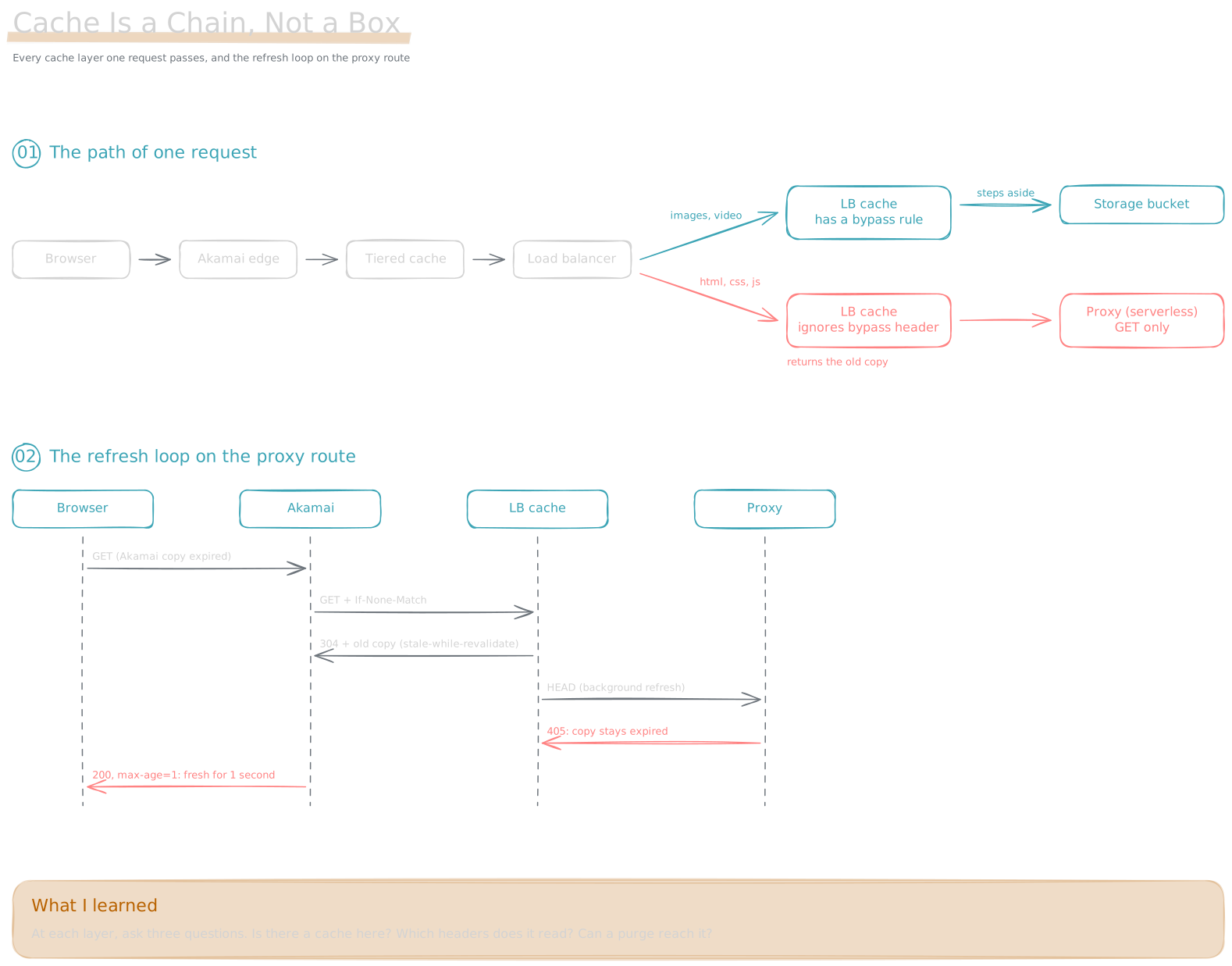
I thought a CDN was one box. After I chased this problem, I learned it is a chain.
The Story
I knew CDNs only at the level of a system design interview: “Add a CDN layer and users load faster.”
Later I looked at a CDN report and found something strange. The domain and the TTL were the same. But HTML left the edge 17 times more often than images. I dug in and found a whole route where files often do not stay in the cache. This route matches by file extension: html, css, and js. Large HTML files were the worst.
To find the cause, I started from “what is a request” and dug down. This series follows the order in which I learned. Each post is one piece I added during the chase.
A Few Terms First
The whole series uses one analogy: a chain of stores with one central warehouse and many local shops.
| Term | Plain meaning | Analogy |
|---|---|---|
| Request | A browser asks a server for a file | A customer asks the shop for one item |
| Header | A small label on a request or response | The notes field on an order |
| Origin | The server where the file really lives | The central warehouse |
| Cache | Keep a copy and reuse it next time | Stock on the local shop shelf |
| Edge server | A server near the user that holds copies | The shop near your home |
| CDN | A network of many edge servers | The whole chain of shops |
| Load balancer | The entrance to the origin. It sends each request to a different machine behind it | The dispatcher at the warehouse door |
| Proxy | A program in the middle that fetches a file and passes it on | An errand runner who goes to the warehouse for you |
| Bypass header | A label that tells the cache “do not use your copy” | A note that says “please get fresh stock from the warehouse” |
A customer asks the nearby shop. The shop goes to the warehouse only when it has no stock. Here is the problem in this story: there is a hidden small shelf at the warehouse door. And it cannot read the notes.
Road Map
- What a CDN Is: A CDN is a group of edge servers near users.
- One HTTP Request: A request is a function call across the network.
- Load Balancer: One Entrance, Many Backends by Rule: Two ways to match, and a cache hidden inside the LB.
- Cache Freshness: Fresh, Stale, and 304: Fresh, stale, and refresh with a 304.
- CDN Terms on One Page: Hit, miss, offload, and other terms.
- Cache Headers: Who Sets, Who Reads: Every header needs someone to set it and someone to read it.
- Akamai Property: One Edge Config: One property is one edge config.
- Akamai Tools: Purge and CLI: Purge, and how to check that a purge worked.
- The Path of One Request: DNS, edge, load balancer, bucket.
- How the Load Balancer Picks a Backend: One domain, two routes.
- Two Cache Layers: What I Believed: I thought the bypass header made the LB cache disappear.
- TTL Is Set in Three Places: TTL passes from storage to client and can only go down on the way.
- Symptom: HTML, CSS, and JS Keep Going to Origin: Split the numbers, and only the route is left.
- A Bypass Header Works Only Where a Rule Reads It: The cache on the proxy route does not read the header.
- Stale-While-Revalidate: Serve Old First, Refresh in the Background: Serve the old file first, refresh in the background.
- The Proxy Rejects HEAD, So the Refresh Always Fails: One 405 makes the refresh fail every time.
- Five Parts Make One Loop: All the parts connect.
- What I Learned: A Cache Is a Chain, Not a Box: What I learned, and the direction it gives me.
Why It Happens: Three Conditions Cross
- A bypass header works only where a rule reads it: the LB cache on the bucket route steps aside. The one on the proxy route does not (A Bypass Header Works Only Where a Rule Reads It).
- The old copy still moves forward: after expiry, the LB cache serves the old file first. The copy reaches Akamai with a very large
Age(Stale-While-Revalidate: Serve Old First, Refresh in the Background). - The refresh always fails: the LB cache refreshes with HEAD, and the proxy accepts only GET (The Proxy Rejects HEAD, So the Refresh Always Fails).
Each of the three conditions is small on its own. Together, every request for a large HTML file goes back to the origin (Five Parts Make One Loop).
What I Learned
Now I follow one request along the whole path. At each layer I ask three questions. Is there a cache here? Which headers does it read? Can a purge reach it? (What I Learned: A Cache Is a Chain, Not a Box)
A CDN makes things faster. But to know where a request stops, you must walk the layers one by one.
Sources: ByteByteGo: How does CDN work, RFC 9111: HTTP Caching, RFC 5861: stale-while-revalidate